
Open Graph is a protocol for adding metadata to a web page that is used by social media platforms to display the page title, description, and an image.
Pagecord already supports Open Graph automatically. For any given post or page, the title is added to the og:title tag, a post summary is added to og:description and, when present, the first image in a post is added to og:image.
If a post or page doesn't have an image, Pagecord will automatically generate an Open Graph image based on the post title, your blog name and your colour scheme. It's a pretty cool feature, and currently only for Premium customers.
The thing is, what if you didn't want the first image in a post to be the one that's used for social media? What if you didn't want any image to be used, preferring to lean on the text-only dynamic card that Pagecord produces?
I've felt this pain, and the remedy has arrived! You can now choose to upload an image specifically for Open Graph purposes, and you can also choose to opt-out of using the images in the post and render the text-only card instead.
To do this, edit a post, click the "..." link to bring up the menu (or press Cmd+. on your keyboard), and select Open Graph Image (or press G when the menu is visible).
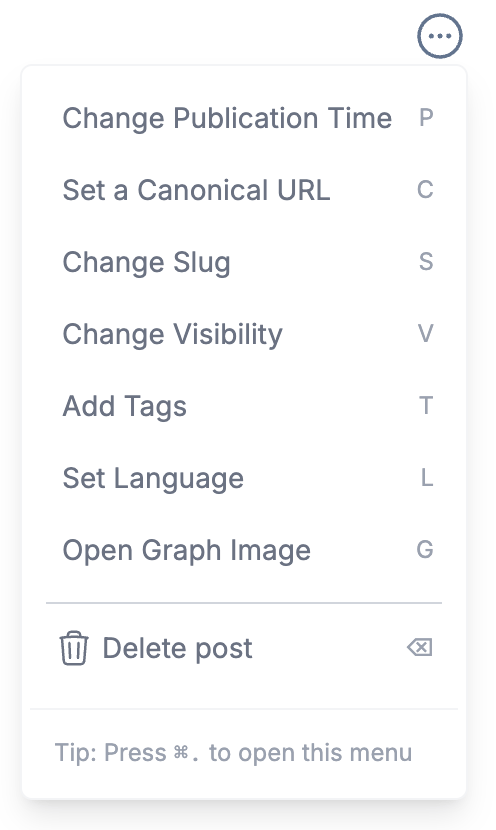
This displays a new section above the post:

If you want a unique Open Graph image, click on the "Click to upload" button to select one (or drag an image in), then click Update Post to save it.
If you'd like to opt-out of using in-post images for Open Graph, click the Use text-based card only checkbox, then click Update Post.

If you've uploaded a custom Open Graph image and decided against it, just click Remove and it will be gone.
This process works for both Posts and Pages, including your Home Page.
Note that Open Graph images are recommended to be 1200x630 pixels, and Pagecord will automatically render your chosen image at that size, cropping the image if necessary.
I hope you find this useful!
ps. If you want an easy way to check the Open Graph data for a given page, take a look at https://www.opengraph.xyz.